Blog
Building SpineSpy: An AI-Powered Posture Monitor for macOS
Feb 1, 2026
I spend hours hunched over my laptop. By the end of the day, my back hurts and I've probably checked my phone 47 times during "focused work." I wanted something to keep me accountable, but not an app that keeps my webcam running 24/7. That's creepy and kills battery.
What I Built
SpineSpy is a macOS menubar app that:
- Takes a quick snapshot every few minutes
- Analyzes posture using AI
- Detects if you're holding your phone
- Alerts you after 5 consecutive "bad" readings
The camera is only on for about a second. No constant surveillance.
Everything runs locally. No data leaves your machine. Snapshots are analyzed on-device and immediately discarded.
How It Works
Every N minutes:
  1. Open camera briefly
  2. Snap a photo
  3. Run AI detection
  4. Close camera
  5. Update menubar icon: 🦸 (good) or 🧟 (bad)
  6. After 5 bad readings → play alert sound
Tech Stack
- MediaPipe Pose - Google's pose estimation model. Detects 33 body landmarks. I use three points (nose and both shoulders) to calculate forward lean and shoulder tilt.
- YOLOv8 - Object detection for spotting phones in the frame.
- rumps - Python library for macOS menubar apps.
- OpenCV - Camera capture and image processing.
- PyInstaller - Bundles everything into a standalone .app.
Detection Logic
Posture
MediaPipe identifies 33 landmarks. I only need three:
nose = landmarks[0]
left_shoulder = landmarks[11]
right_shoulder = landmarks[12]
Two metrics:
# Forward slouch: nose closer to camera than shoulders
shoulder_z = (left_shoulder.z + right_shoulder.z) / 2
forward_lean = shoulder_z - nose.z

# Side tilt: shoulders at different heights
tilt = abs(left_shoulder.y - right_shoulder.y)

if forward_lean > 0.1:
    return "Slouching"
if tilt > 0.05:
    return "Tilting"
The Z-coordinate represents depth. When you slouch, your nose moves closer to the camera relative to your shoulders.
Phone Detection
YOLOv8 is trained on COCO, which includes "cell phone" as class 67:
results = yolo(frame)
for detection in results:
    if detection.class_id == 67:
        return True
Problems I Ran Into
Camera Warm-up
First frame from a webcam is often black. The sensor needs time to adjust exposure.
Fix: discard the first few frames.
time.sleep(0.5)
for _ in range(5):
    cap.read()  # Discard warm-up frames
ret, frame = cap.read()  # Real frame
MediaPipe API Changes
MediaPipe moved from mp.solutions.pose to a new Tasks API. Every tutorial online was outdated.
Old (deprecated):
mp_pose = mp.solutions.pose
pose = mp_pose.Pose()
results = pose.process(image)
New:
from mediapipe.tasks.python import vision

options = vision.PoseLandmarkerOptions(...)
detector = vision.PoseLandmarker.create_from_options(options)
result = detector.detect(image)
Phone Detection Accuracy
YOLOv8n (nano model) was unreliable. Missed obvious phones, false positives on random objects.
| Model | Speed | Accuracy | Size |
|---|---|---|---|
| YOLOv8n | Fast | Lower | 6MB |
| YOLOv8s | Medium | Better | 22MB |
| YOLOv8m | Slower | Best | 52MB |
Upgraded to YOLOv8s. For an app that runs every few minutes, the extra inference time doesn't matter.
False Positives
A single bad reading shouldn't trigger an alert. Maybe you just leaned over to grab coffee. The "5 consecutive bad readings" rule filters out noise while catching sustained bad posture.
PyInstaller Bundling (The Hard Part)
Getting it to work in development was easy. Getting it to work as a standalone .app was not.
After building with PyInstaller, the app would install but:
- Menubar icon didn't show the emoji
- Camera didn't turn on
- No error messages. Just silent failure.
Two issues:
1. Missing MediaPipe native libraries
PyInstaller wasn't bundling MediaPipe's C bindings (mediapipe.tasks.c). The app crashed silently when loading the model.
2. Wrong model file paths
MODEL_PATH = "pose_landmarker.task"
yolo = YOLO("yolov8n.pt")
These paths work when running from the project directory. Inside a PyInstaller bundle, the working directory changes. The app couldn't find the models.
The fix:
Updated build_dmg.sh:
pyinstaller --name SpineSpy \
    --windowed \
    --noconfirm \
    --add-data "pose_landmarker.task:." \
    --add-data "yolov8n.pt:." \
    --hidden-import rumps \
    --hidden-import cv2 \
    --hidden-import mediapipe \
    --hidden-import ultralytics \
    --hidden-import mediapipe.tasks.c \
    --collect-all mediapipe \
    --osx-bundle-identifier com.jananadiw.spinespy \
    menubar_app.py
Added a path helper:
import sys
from pathlib import Path

def resource_path(relative_path):
    try:
        base_path = sys._MEIPASS
    except AttributeError:
        base_path = Path(__file__).parent
    return str(Path(base_path) / relative_path)
Updated model paths:
MODEL_PATH = resource_path("pose_landmarker.task")
yolo = YOLO(resource_path("yolov8n.pt"))
PyInstaller extracts bundled files to a temp directory (sys._MEIPASS). The helper handles path resolution for both dev and bundled modes.
Debugging this was painful. The app failed silently. I had to run the .app from Terminal to see errors, add logging everywhere, and check Console.app for system-level issues.
Result
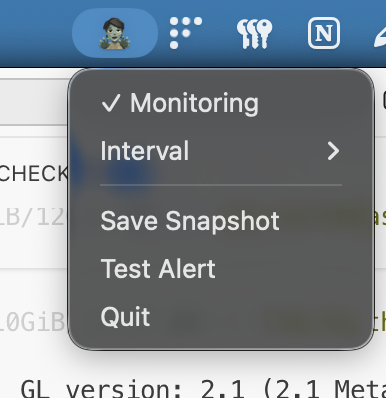
A tiny 🦸 or 🧟 in my menubar. When I see the zombie, I straighten up. After 5 zombies in a row, I hear a sound and take a break.
Resource usage is minimal. Camera runs for ~1 second every few minutes. CPU spikes briefly during inference, then idles. Memory sits around 150MB idle, 200MB during inference. Slack uses 500MB+ doing nothing.
Usage
git clone https://github.com/jananadiw/spinespy
cd spinespy
python -m venv venv
source venv/bin/activate
pip install -r requirements.txt
python menubar_app.py
To build the .app:
./build_dmg.sh
Right-click the menubar icon to pause/resume, change check interval, test the alert, or view stats.
What's Next
- Custom alert sounds
- Stats dashboard to track posture over time
- Break reminders
- Configurable sensitivity thresholds
- Windows/Linux support
- Signed builds (no more Gatekeeper warnings)
Takeaways
- Camera APIs have quirks. Warm-up time, frame buffering, cleanup all matter.
- Model selection is about tradeoffs. Bigger = more accurate but slower.
- PyInstaller bundling needs explicit config. Hidden imports, resource paths, native libs. Defaults don't work for complex dependencies.
- Silent failures are the worst. Add logging early.
- UX details matter. "5 consecutive bad readings" vs "every bad reading" is the difference between useful and annoying.
Code is on GitHub.

